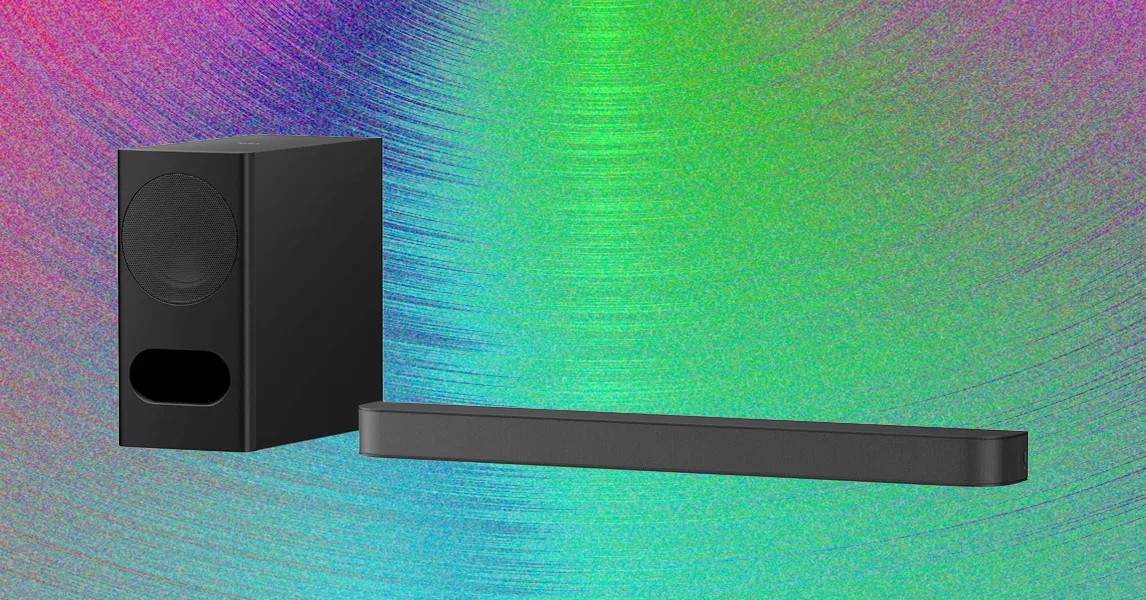
Sony’s recent strategy for its soundbar lineup has prioritized sleek aesthetics and streamlined designs, often at the expense of connectivity and user customization. The Bravia Theater Bar 5 exemplifies this approach. Priced at $350, it occupies a curious middle ground: it lacks the premium features expected at this price point, yet delivers a sonic performance that belies its “budget” appearance.
For consumers seeking a plug-and-play audio upgrade, the Theater Bar 5 is a compelling, if imperfect, choice. It sacrifices versatility for raw power, offering a cinematic experience that punches well above its weight class, provided you are willing to accept its limited feature set.
Minimalist Design and Setup
The Theater Bar 5 arrives in a straightforward two-piece package: a matte-black, three-foot main bar and a rectangular wireless subwoofer. The design philosophy is strictly utilitarian. There are no superfluous buttons on the hardware itself—just a single power button on the side and a minimalist two-dot LED indicator.
Setup is remarkably simple, catering even to those less comfortable with technology. However, the “minimalist” label extends to the box contents in a frustrating way: connection cables are not included. Users must supply their own HDMI or optical cable.
- HDMI eARC/ARC : The recommended connection method, allowing for high-quality audio transmission and unified volume control via the TV remote.
- Optical Input : A legacy option for older TVs or CD players.
- Missing Links : There is no secondary HDMI port for game consoles or Blu-ray players, nor are there analog inputs for turntables.
The companion Bravia Connect app is essential for full functionality. It guides users through setup, enables Bluetooth pairing for music streaming, and provides access to settings that the remote cannot control. The included remote is small and limited to basic playback controls, serving mostly as a backup when a smartphone is out of reach.
Software and Connectivity Limitations
While the hardware is simple, the software experience is mixed. The Bravia Connect app is clean and intuitive, offering useful features such as:
* Real-time display of current audio format and resolution.
* Bass adjustment controls.
* Remote power management for streaming.
However, the Theater Bar 5’s connectivity options reveal significant compromises for a $350 device:
1. No Wi-Fi : This excludes smart assistant integration (Alexa/Google), multi-room audio syncing (like Sonos or Bose), and high-quality network streaming.
2. Limited Bluetooth : Audio quality is compressed, suitable for casual listening but not audiophile-grade.
3. No EQ or Calibration : Beyond basic bass adjustments, there is no equalizer or room calibration tool to fine-tune sound for specific environments.
Despite these limitations, the bar supports all major high-resolution audio formats, including Dolby Atmos and DTS:X. It is important to note that the 3.1-channel configuration lacks upfiring drivers. Instead, Sony relies on virtual surround software to simulate overhead and side effects, a technique that proves surprisingly effective in practice.
Sound Performance: Power Over Precision
The Theater Bar 5’s primary strength is its audio output, driven largely by its substantial 16-inch wireless subwoofer. In testing, the system consistently outperformed standard TV speakers, delivering clear dialogue and impactful bass.
Cinematic Immersion
The balance between the main bar and the subwoofer is seamless. The subwoofer handles low-end frequencies with authority, while the bar manages mid-range details, creating a smooth transition that avoids muddy overlap.
- Action Scenes : In Guardians of the Galaxy Vol. 2, the subwoofer provided visceral impact during space chases, while the bar maintained clarity in dialogue. Similarly, the gritty texture of dirt bikes in Skyfall was rendered with impressive detail.
- Virtual Surround : With “Sound Field” mode engaged, the bar effectively expands the soundstage laterally. In Ant-Man, swirling sound effects during the shrinking sequence felt expansive and immersive, spilling beyond the physical boundaries of the device without the hollow echo common in cheaper soundbars.
Music Playback
The system’s approach to music is more nuanced. The Sound Field mode, while beneficial for movies, can negatively impact stereo music. Initial tests with yacht rock revealed a “squishy” and muffled quality. Disabling the virtual surround effect tightened the stereo image, revealing clearer instrument separation and vocal precision.
Key Insight : For music listeners, manually toggling off Sound Field mode is necessary for optimal fidelity. Users may also benefit from enabling Sony’s DSEE codec in the app to enhance the clarity of compressed audio files.
Conclusion
The Sony Bravia Theater Bar 5 is a product of clear priorities. It strips away connectivity options, smart features, and customization tools to focus entirely on core audio performance. While competitors at this price point may offer more features, few match the raw punch and cinematic immersion provided by this subwoofer-heavy setup.
It is an ideal choice for viewers who want a straightforward, high-impact upgrade for their TV without the complexity of a full home theater system. However, for those who value music fidelity, smart home integration, or flexible connectivity, the Theater Bar 5’s limitations may outweigh its sonic strengths.